介绍:
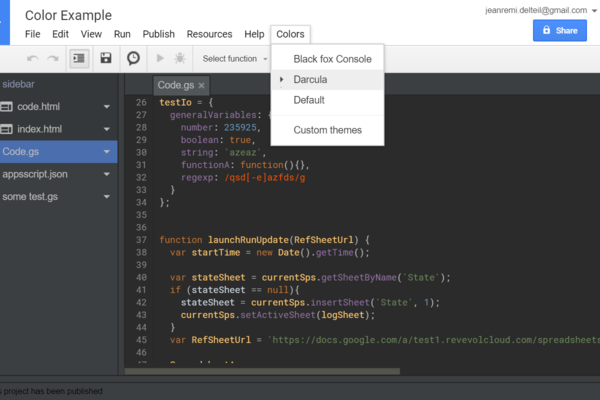
AppsScript Color - Chrome 应用商店, Provides folders display and a dark color theme to the google apps script editor.
AppsScript Color provides other color themes for Apps Script developers.
These dark themes are more contrasted and comfy, allowing to code for hours !
Choose from the 'Colors' integrated menu one of the following themes :
3 dark themes are available in the IDE (themes only applies to the IDE, not to the full page)
Use the "Sun/Moon" icon to toggle the dark mode on and off, To select a different color theme, open the IDE action menu with [F1] (while focusing the IDE), then type either "theme", or one of the following:
- Darcula
- Monokai
- BlackFoxConsole
For now the extension applies a color theme of your choice on Apps Scripts open on script.google.com
It works for standalone scripts and scripts linked to native Google documents.
AppsScriptColor also add a structured Folder view for a tidier file list !
To add folders, rename your files to include the path in their name:
myFolder/some_subfolder/myfileName
## ChangeLog
v1.5.1
- [#39](https://github.com/JeanRemiDelteil/appsScriptColor/issues/3
备注:
无
更新时间:
2026-04-09
扫码关注公众号:

 收藏猫插件
收藏猫插件