介绍:
Nureva Screen Share - Chrome 应用商店, Share your desktop or applications in Nureva™ Span™ software
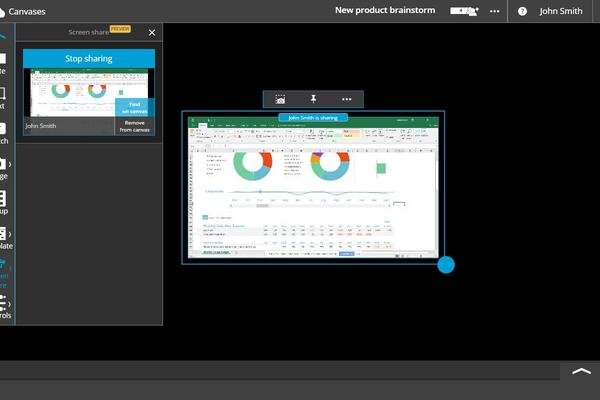
It’s now easy for groups to share live content in Nureva Span Workspace. Within one canvas, multiple team members can each share an application or desktop, creating a dynamic collaboration space that includes all the data and content essential to group processes.
ACCESS LIVE CONTENT – teams can easily pull content such as design mockups, website templates, videos, spreadsheets, charts and diagrams into creative collaboration sessions.
VIEW MULTIPLE SCREEN SHARES – more than one user can share an application at once, so all the real-time information needed for team processes is available in one place.
ENABLE REMOTE CONTRIBUTORS – remote participants can share their screens with the rest of their teams, making it simpler to fully participate in group discussions and decision making.
SHARE SPECIALIZED APPLICATIONS – content from any application can be easily viewed on the Span canvas.
CAPTURE CONTENT INTO A CANVAS – anyone can take screen captures of shared applications and add them to a Span canvas. The
备注:
无
更新时间:
2026-06-05
扫码关注公众号:

 收藏猫插件
收藏猫插件